Titan Converter's AI Background Removal, Explained
Removing a background used to mean careful manual selection in an image editor. Titan Converter's AI Background Removal is a Pro-only feature that does it automatically, fully offline. Here's what it actually is and where it fits.
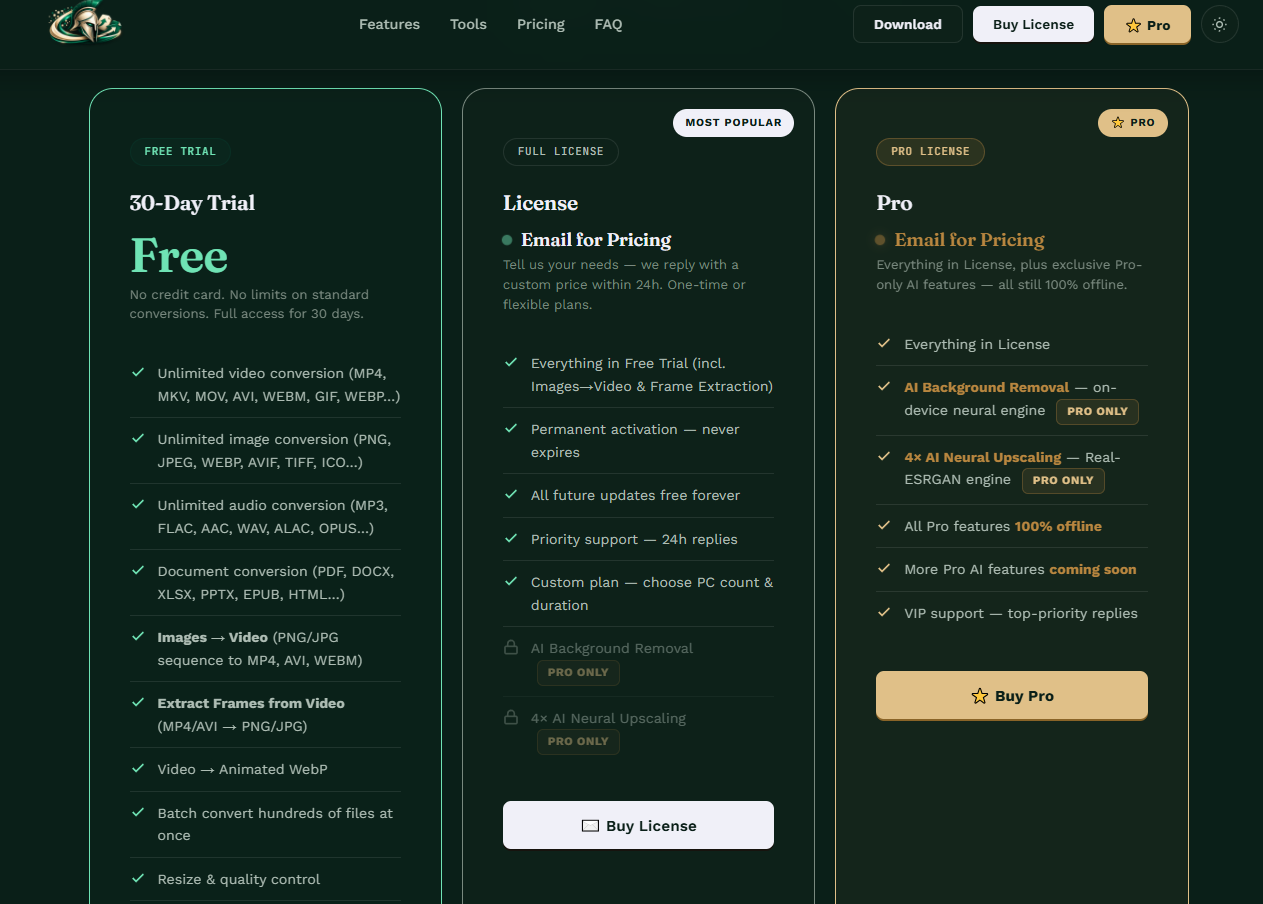
AI Background Removal sits behind the Pro tier, alongside 4x neural upscaling, both run on-device rather than in the cloud.
What AI Background Removal Actually Does
Background removal — identifying the main subject of an image and cutting away everything behind it, usually leaving a transparent background — used to require either real skill in an image editor (careful manual selection, masking, cleanup around edges) or a separate tool built specifically for the job. Titan Converter's version is built into its Pro tier and runs the removal automatically using an on-device AI model.
"On-device" is the detail worth paying attention to. A lot of free background removers online work by uploading your image to a server, processing it there, and sending back the result. Titan Converter's approach processes the image locally, which matters if you're working with images you'd rather not upload anywhere, or if you want the tool to work without depending on an internet connection.
A Pro-Only Feature, Not Part of the Free Tier
Titan Converter's pricing structure splits into a free 30-day trial, a paid License, and Pro. General file conversion, image conversion, audio conversion, and document conversion are unlimited even on the free trial. AI Background Removal and the related 4x AI Neural Upscaling feature are both locked specifically to Pro, marked as such even within the free trial period, which does still grant temporary access to test them.
- Unlimited standard file conversion
- Extract Frames and Frames → Video
- AI Background Removal & 4x Upscaling (trial period only)
- Continued AI Background Removal access
- Continued 4x AI Neural Upscaling access
- Pricing is quoted by email, not published
Removing a Background Step by Step
Open Titan Converter
Use the web version at titanconverter.site or the offline desktop app — the offline app is the more natural fit here, since the whole point of this feature is on-device, no-upload processing.
Select BG Remove
It's listed in the main tool bar alongside Convert and the other tools, marked as a Pro feature.
Upload your image
Add the image you want the background removed from.
Run and check the edges
Process the image, then zoom in on the edges of the subject — especially fine detail like hair — before deciding the result is final.
Where AI Background Removal Tends to Struggle
No automatic background remover, including this one, handles every image equally well. Clean, high-contrast subjects against a simple background — a product photo on a plain backdrop, a portrait against a solid wall — tend to produce the cleanest results with minimal cleanup needed. Fine, wispy detail like hair, fur, or semi-transparent edges (glass, smoke, thin fabric) is where automatic removal tools across the board, not just this one, tend to leave visible artifacts or overly sharp cutoffs.
This isn't a knock specifically on Titan Converter's implementation — it's a known hard problem in this category of AI tool generally. The practical takeaway is to check results on your actual subject type before assuming it'll handle everything perfectly, especially if you're removing backgrounds from images with complex edges as a regular part of your workflow.
Titan Converter vs. a Dedicated Free Background Remover
Standalone background-removal tools and websites are common, and several have solid free tiers. The real distinguishing factors between those and Titan Converter's version come down to two things: whether processing happens on-device or on a server, and whether you'd rather have this feature bundled with a broader file converter you're already using for other tasks, instead of juggling a separate dedicated tool just for this one job.
If background removal is the only thing you need and you don't already use Titan Converter for anything else, a dedicated free tool might be the simpler choice. If you're already converting files with Titan Converter regularly and want background removal in the same place without uploading images elsewhere, the Pro tier's version becomes more appealing specifically for that consolidation.
Cost is the other factor worth weighing honestly. Many dedicated background removers offer a workable free tier for occasional use, while Titan Converter locks this specific feature to Pro after the 30-day trial. If background removal is something you need only occasionally, it's worth comparing the actual cost of Pro against how often you'd realistically use this one feature versus the rest of the toolkit.
Who Actually Benefits From This
Online Sellers
Cleaning up product photos for a consistent, clean-background look across a storefront or marketplace listing.
Content Creators
Cutting out a subject for thumbnails, overlays, or compositing into a different background image.
Privacy-Conscious Users
Anyone who'd rather not upload personal or work images to a third-party server just to remove a background.
Existing Titan Converter Users
Anyone already converting files with the tool who'd rather not add a second, separate app just for this one task.
The Bottom Line
AI Background Removal is a genuinely useful addition for anyone already using Titan Converter, particularly because it runs fully on-device rather than uploading images to a server. It's locked behind the Pro tier once the 30-day trial ends, and results — like every automatic background remover — are strongest on clean, simple images and more mixed on fine detail like hair. The free trial is the right way to test it against your own actual images before deciding whether Pro is worth it for this specifically.
Frequently Asked Questions
Is AI Background Removal available on the free trial?
Yes, but only as part of the 30-day free trial period. It's listed as a Pro-only feature, meaning after the trial ends, continued access requires the Pro tier, which is quoted by email rather than listed at a fixed price.
Does removing the background reduce image quality?
The subject itself shouldn't lose quality, since the tool is identifying and cutting out the background rather than re-processing the whole image. Edge quality around fine detail like hair or fur is the area where AI background removers, including this one, tend to vary most in practice.
Does this work on video, or only still images?
Titan Converter's AI Background Removal is built for images. Video background removal is a substantially harder technical problem (removing a background consistently across every frame without flickering), and isn't part of this specific tool based on how it's currently listed.
How is this different from a free background remover online?
The main practical differences are that it runs fully offline rather than uploading your image to a server, and it's bundled inside a broader file converter rather than being a standalone single-purpose tool. Whether that's an advantage depends on whether you value offline processing and already use Titan Converter for other conversions.
Can I batch-remove backgrounds from multiple images at once?
This depends on whether Titan Converter's interface supports multi-file selection for the BG Remove tool specifically, similar to its batch support for general conversion. It's worth testing with a small batch during the free trial to confirm before relying on it for a large set of images.
Titan Converter — Official Site • titanconverter.site • Titan Converter on YouTube
More from the creator
Explore two other projects from the same creator.