Titan Converter Review: One Tool for File Conversion and Music Removal
Most file converters do one thing: change a file from format A to format B. Titan Converter (titanconverter.site) combines that with a more specialized tool built specifically for one common, annoying problem — getting rid of background music in a video without losing the voice. Here's what it actually offers.
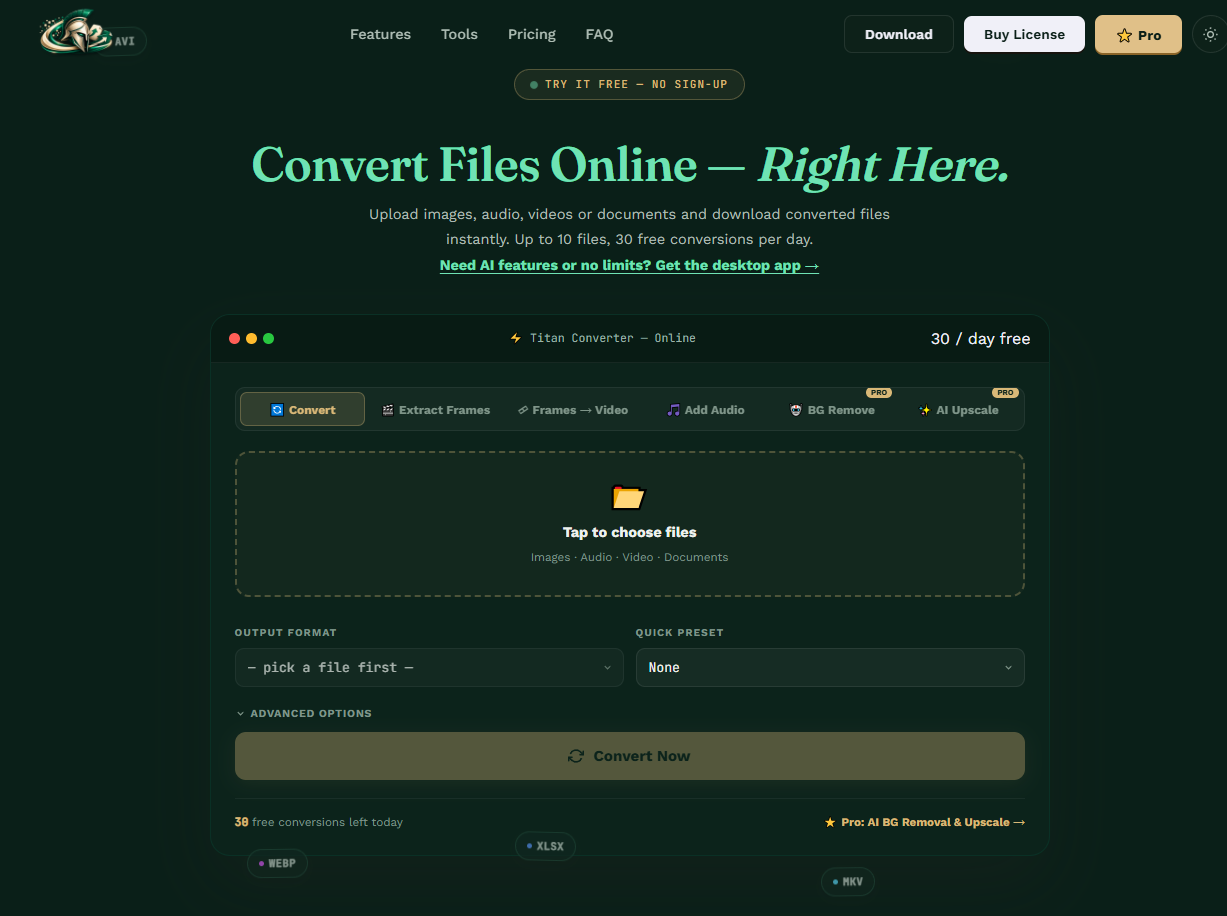
Titan Converter's web-based tool covers conversion, frame extraction, and several Pro-only AI features from one interface.
What Titan Converter Actually Is
Titan Converter is a file conversion tool built to handle a broad range of file types, offered in two forms: a web-based converter you can use directly at titanconverter.site, and a downloadable offline application for anyone who'd rather convert files locally without uploading them anywhere. That dual approach is worth noting on its own — a lot of converters are online-only, which means every file has to leave your device to get processed. Having an offline option gives you a choice depending on how sensitive a given file is, or simply how much you trust doing the job locally.
The tool is positioned as a general-purpose converter rather than one narrowly focused on a single file category, which is the more common design for tools in this space (a dedicated video converter, a dedicated image converter, and so on, each as separate products). Titan Converter's pitch is consolidating that into one place.
The Music Remover: Removing Background Music, Not Muting the Whole Video
The feature that sets Titan Converter apart from a plain file converter is its Music Remover tool. It's important to be clear about what this actually does, because it's a meaningfully different (and harder) job than what most "remove audio" tools offer: rather than stripping the entire audio track — which also kills any spoken dialogue, voiceover, or narration in the video — the Music Remover is built to target background music specifically and leave the voice track intact.
- Strips the entire audio track
- Voice, dialogue, and narration are gone too
- Fine only if you want a fully silent video
- Targets background music specifically
- Keeps spoken voice and dialogue intact
- Useful when the music is the problem, not the talking
This distinction matters a lot in practice. Think of a recorded lecture, a vlog, a product demo, or a screen recording that happens to have a copyrighted song playing in the background — muting the whole thing would also silence the presenter. A tool built specifically to separate music from voice solves a problem that a generic converter's basic "remove audio" checkbox simply can't.
Two Ways to Use It
Online (Web-Based)
Use the converter directly in your browser at titanconverter.site — no installation, works from any device with an internet connection.
Offline (Desktop App)
A downloadable version for anyone who wants to convert or process files locally, without uploading them to a server — useful for larger files, private files, or working without a reliable connection.
Which one makes more sense depends on what you're converting. For a quick, low-stakes conversion, the web version is the path of least friction. For anything sensitive, or for very large video files where uploading itself would take a while, the offline app is the more practical option.
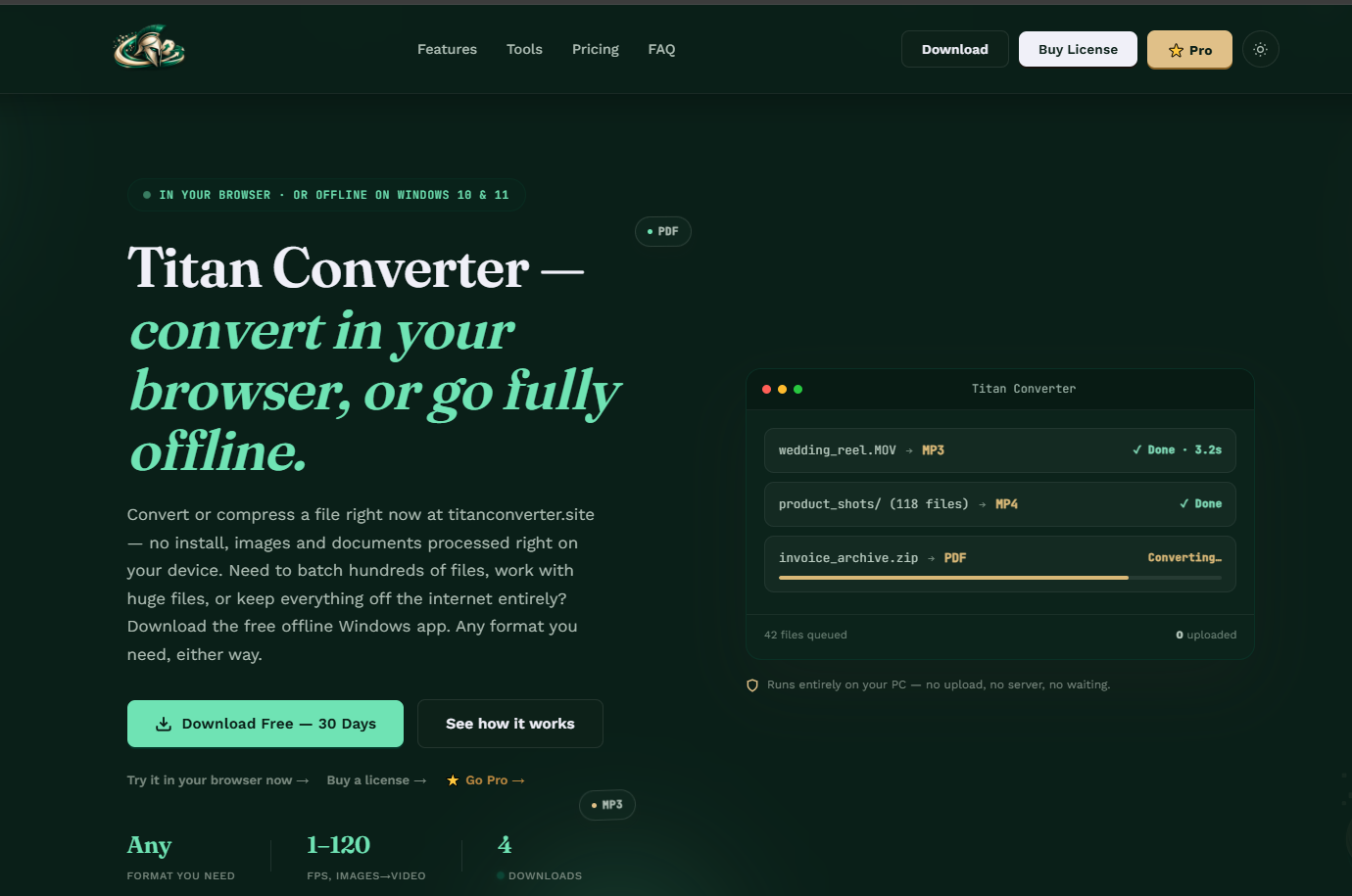
The offline desktop app processes files locally, including batch jobs with over a hundred files at once, with no upload step.
What It Costs
Titan Converter offers a 30-day free trial, giving you enough time to actually test it against your own files rather than judging it from a demo or a features list alone. That's a genuinely useful window for a conversion tool specifically, since the real test of any converter is whether it handles your specific file types and use case well, not whether it looks capable on paper.
If pricing transparency matters a lot to you upfront, the email-for-a-quote model will feel like an extra step compared to services that list a price directly on the page. The trade-off is that it also leaves room for the pricing to reflect your specific use case (personal vs. commercial use, for instance) rather than a single fixed number for everyone.
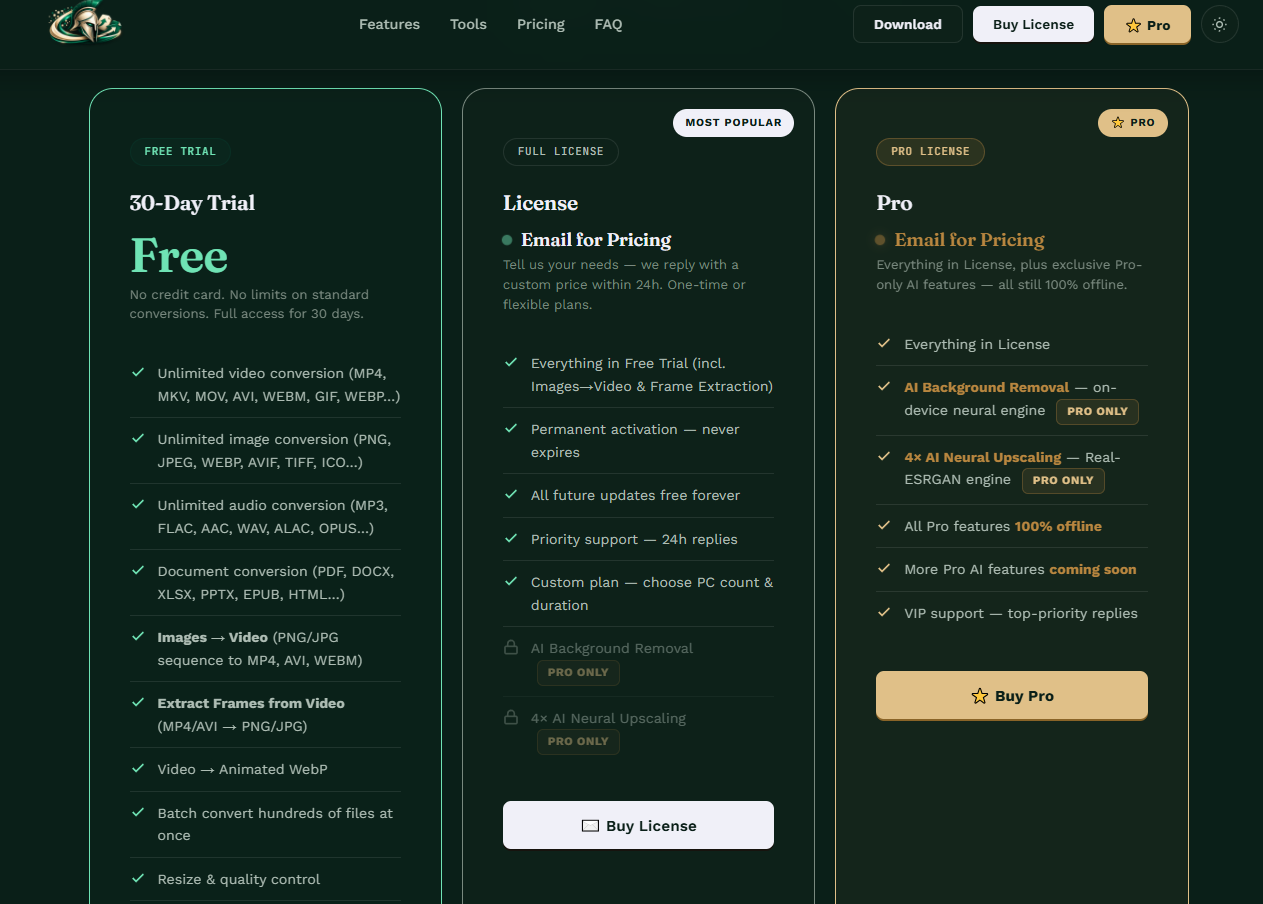
The three tiers side by side: a full-featured 30-day free trial, a permanent License, and Pro, which adds AI background removal and 4x neural upscaling.
Titan Converter vs. Using Separate Single-Purpose Tools
The alternative to a tool like Titan Converter is what most people currently do by default: use one site or app for file format conversion, and a completely separate tool for anything audio-related like music removal. That works, but it means juggling multiple accounts, multiple interfaces, and multiple sets of upload limits and privacy policies to trust, just to get through what's often a single overall task (convert this file, and also clean up its audio).
Consolidating both into one tool has an obvious appeal for anyone who does this kind of work regularly — fewer tools to learn, fewer places your files pass through, and one place to check when something isn't working as expected. The trade-off worth watching for with any consolidated tool is whether combining features means either side is weaker than a tool built to do just one thing extremely well. That's exactly why the 30-day trial matters here: it's long enough to actually test both the general conversion side and the Music Remover specifically against your own files, rather than assuming a combined tool automatically means combined quality.
Who Should Actually Consider This
Content Creators
Anyone recording tutorials, vlogs, or screen captures where background music sneaks in and needs to go — without losing the voiceover.
Educators and Presenters
Recorded lectures or presentations with a music intro or background track that shouldn't carry over into the final, distributable version.
Anyone Converting Files Regularly
If you frequently need to change file formats and would rather have one tool cover multiple file types instead of juggling several single-purpose converters.
Privacy-Conscious Users
The offline app option matters specifically for anyone who'd rather not upload certain files to a server at all.
What's Worth Verifying Before You Commit
Since Titan Converter is still building out its public presence and pricing hasn't been formalized yet, it's worth going in with a few specific questions to ask directly when you email for a quote, rather than assuming details that aren't published. Ask exactly which file formats and maximum file sizes are supported for both the online and offline versions, since these can differ between a browser-based tool and a locally installed one. It's also worth asking directly what happens to files processed through the online version afterward — whether they're deleted automatically and on what timeline — particularly if you'll be uploading anything sensitive rather than using the offline app.
Finally, since the Music Remover is the tool's standout feature, it's reasonable to ask what happens with more complex audio — multiple background tracks, music that overlaps heavily with speech, or lower-quality source audio — since separation quality on straightforward cases doesn't always predict how well a tool handles messier real-world files. The free trial is exactly the right way to answer that question yourself before any money changes hands.
Titan Converter's Feature Range, Demonstrated
Rather than just describing what Titan Converter can do, it's more convincing to actually watch it — the team publishes short demo clips of individual features, and a handful of them together give a clearer sense of how broad the "one converter for everything" pitch really is in practice.
Convert WebP images to PNG in seconds
Compress a video without losing quality
Extract 250+ image frames from one video
Remove an image background, fully offline
Batch-convert hundreds of files at once
Convert files fully offline, no upload
None of these six clips are the Music Remover specifically — that gets its own dedicated walkthrough in our separate guide — but together they show the breadth the "everything converter" positioning is actually referring to: image format conversion, video compression, frame extraction, offline background removal, batch processing, and fully offline operation, all inside the same tool.
The Bottom Line
Titan Converter's core pitch is combining general file conversion with a genuinely more specialized tool — a Music Remover that separates background music from voice, rather than just muting everything — and offering both an online and an offline way to use it. The 30-day free trial gives you a real window to test it against your own files before committing, and the lack of published pricing means the next step, if you're interested, is reaching out directly for a quote.
Frequently Asked Questions
Does Titan Converter remove all audio from a video, or just the music?
Its Music Remover tool is specifically built to remove background music while keeping spoken voice and dialogue intact, which is a different and more targeted job than a basic mute or remove-audio function that strips everything.
Can I use Titan Converter without an internet connection?
Yes. Alongside the web-based version at titanconverter.site, there's a downloadable offline desktop application for converting and processing files locally.
How much does Titan Converter cost?
Pricing isn't listed as a fixed number on the site yet — you'll need to email the team directly for a quote on the Pro or licensed version. There's a 30-day free trial available in the meantime to test the tool itself.
Titan Converter — Official Site • titanconverter.site • Titan Converter on YouTube
More from the creator
Explore two other projects from the same creator.